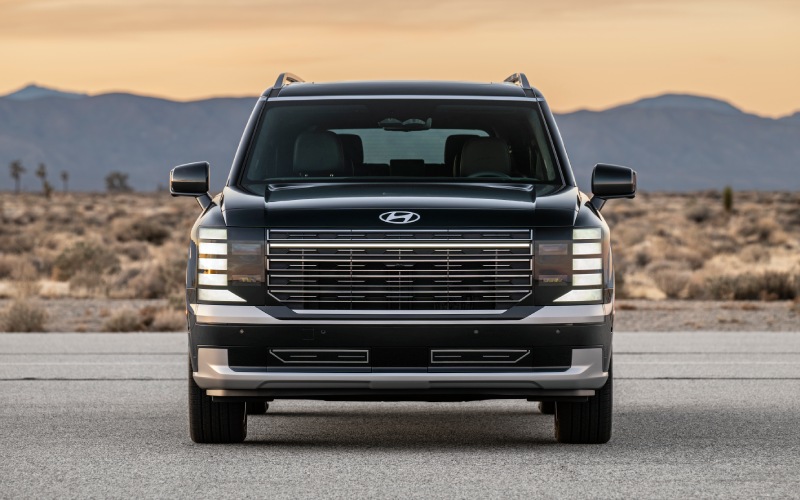
CardinaleWay Hyundai Glendora - Can the 2026 Hyundai Palisade's Built-in Dash Cam Help with Parking in Anaheim, CA?
Arriving guests, busy shift changes, and event nights can turn Anaheim parking into a contact sport. From the Mickey & Friends and Pixar Pals structures to Angel Stadium and Anaheim GardenWalk, tight ramps and crowded aisles raise a simple, practical question for family SUVs: will your vehicle quietly record the moments that matter if something happens? With the 2026 Hyundai Palisade, the answer is confidence-building thanks to its built-in, dual-camera Dash Cam that can record while you drive and automatically capture activity when parked. At CardinaleWay Hyundai Glendora, we help Anaheim drivers see exactly how this feature fits daily life.
Below, we explain how the Palisade’s integrated Dash Cam works, why it makes sense for Anaheim-area parking, and what to consider for setup, storage, and day-to-day use. We also outline related safety and parking tech that complements the camera, so you leave our showroom ready for downtown errands, school pick-ups, convention center runs, and weekend outings.
What the 2026 Palisade’s built-in Dash Cam does
The 2026 Palisade introduces Hyundai’s first built-in, two-camera Dash Cam designed to record continuously as you drive and to automatically capture motion-based events while parked. Because it’s integrated, you view and manage clips right from the Palisade’s display — no dangling wires, suction cups, or separate apps required. When you want to export video, you can remove the MicroSD card housed in the glovebox and share footage as needed.
Paired with vehicle sensors, the system can help document important moments — a sudden stop on the 5, a door tap in a garage, or movement near your bumper while you are inside a restaurant. Video segments are easy to locate through the on-screen menu, and the OEM integration means the system is tuned to the Palisade’s cabin, sightlines, and power management for a refined experience.
Why it matters for Anaheim parking and SoCal drives
Anaheim’s mix of entertainment venues and multi-level garages rewards a vehicle that is ready before you even think about it. The Palisade’s built-in Dash Cam is especially helpful in scenarios like:
- Downtown structures where tight turns and pillars limit visibility
- Surface lots near schools, shops, and local parks with frequent foot traffic
- Event nights around Angel Stadium and the Honda Center when spaces fill quickly
- Apartment and townhome communities where parking is shared and overnight activity varies
Because the camera can record while you drive and help capture movement when you are parked, you have a simple, centralized way to review what happened and share a clip with building management or your insurance representative if needed. It is peace of mind that travels with you, whether you are headed to the Anaheim Packing District, commuting up the 57, or meeting friends at GardenWalk.
Quick setup guide — from delivery day to first clip
Our team at CardinaleWay Hyundai Glendora will gladly walk you through setup during your test drive. If you prefer to do it yourself, these steps get you rolling quickly. You will not need a laptop — just the vehicle screen and a suitable MicroSD card.
- Insert the MicroSD card: Open the glovebox and insert a compatible card into the Dash Cam slot.
- Format in-vehicle: On the center display, open the Dash Cam menu and select format to prepare the card.
- Choose recording preferences: Enable driving and parked-event recording, and confirm default clip length.
- Adjust timestamp and units: Confirm date, time, and speed units for clear documentation.
- Review privacy settings: Set your preferences for audio capture where applicable and follow local guidelines.
- Check camera views: Verify the front and interior/rear-facing perspectives display as expected.
- Test and save: Take a short drive, stop, and review your first clip on the screen.
Once configured, the Palisade manages recording automatically. If an event occurs, you can mark and protect a clip so it is not overwritten by loop recording.
Storage, video access, and best practices
Like most integrated dash cams, the Palisade uses loop recording, overwriting the oldest files when the MicroSD fills up. We generally suggest a high-endurance MicroSD card for dependable performance in heat and frequent write cycles. Anaheim summers and garage environments can be warm — endurance-rated cards are designed for that duty.
To access video, open the Dash Cam viewer on the center display to filter by date or event type, then protect or export the clip you want. For sharing, remove the MicroSD card in the glovebox and transfer files to your device. As with any recording device, be mindful of privacy and follow local and state guidelines when capturing or sharing audio and video. See the Owner’s Manual for file formats, capacity guidance, and feature limitations.
More than a camera — parking tech that helps you avoid incidents
The Dash Cam is part of a broader confidence toolkit. When maneuvering in a crowded Anaheim garage, the Palisade’s available Surround View Monitor and Blind Spot View Monitor can help you see around corners and alongside the vehicle. Parking Collision-Avoidance Assist-Reverse can provide a warning and, if needed, help with braking as you back into a tight spot. Remote Smart Parking Assist can even help you park or pull out of a space using the key fob when that narrow aisle leaves little room to open doors.
Inside, the available full-display digital center rearview mirror uses a liftgate-mounted camera to help you see behind the vehicle when people or cargo obstruct the back window — helpful when the third row is full after a day at Disneyland Resort or during team carpools. Together with standard Hyundai SmartSense features, this technology suite aims to help you avoid the bump in the first place — and document it clearly if it happens.
Frequently Asked Questions:
Does the Palisade’s Dash Cam keep recording when I park at an Anaheim garage?
Yes. When enabled, the built-in Dash Cam can work with vehicle sensors to automatically record nearby movement while parked. You can review these event-based clips on the Palisade’s display and export them via the MicroSD card in the glovebox. See the Owner’s Manual for details and limitations.
Will using the Dash Cam drain the battery if I leave my Palisade at the airport?
The system is engineered to manage power intelligently. Event-based parking recording is not the same as continuous recording and is designed to help conserve energy. For extended parking, set your preferences in the Dash Cam menu and consult the Owner’s Manual for guidance on power management.
Where do I find the Dash Cam’s MicroSD card, and what size should I use?
The MicroSD card slot is in the glovebox. We recommend a high-endurance card with ample capacity to retain more historical footage before loop recording begins. Our team can show you recommended options and help you format the card in-vehicle.
Can I watch Dash Cam clips on the Palisade’s screen without removing the card?
Absolutely. You can view, protect, and manage recordings directly on the center display. Only remove the MicroSD card when you need to transfer files to another device or maintain your storage.
Is it legal to record audio and video on public roads in California?
California allows dash cams, and the Palisade’s system is factory-integrated. As with any recording, follow applicable laws and privacy guidelines, especially regarding audio. For specific legal questions, consult your own advisor.
How does this differ from the Palisade’s available digital rearview mirror?
The full-display digital center rearview mirror provides a live camera view behind the vehicle to help improve visibility when the window is obstructed. The Dash Cam records footage for later review and export. They are complementary features serving different needs.
If an incident occurs, how do I share a clip with my insurance company?
Mark the clip as protected in the viewer, then remove the MicroSD card and transfer the file to your device. We can demonstrate the process at CardinaleWay Hyundai Glendora and help you set up a simple routine for saving and sharing files.
Because Anaheim life moves fast — from convention center events to weekday commutes — it helps that the Palisade lets you handle everything in one place. You can review the clip on-screen, save it to the card, and get back on the road with minimal fuss. The system pairs well with the Palisade’s standard wireless Apple CarPlay® and Android Auto™ for everyday connectivity, while features like Bluelink® keep you informed and connected beyond the drive.
And if parking tight spots is part of your routine, available convenience features can make a big difference. Remote Smart Parking Assist can help you slip into a space; the Surround View Monitor can show a bird’s-eye perspective; and Safe Exit Assist can provide warnings if vehicles approach from behind when passengers open a door. It all adds up to a three-row SUV that is as capable in an Anaheim garage as it is on weekend drives along the coast.
If you are comparing trims or deciding between the ICE and new hybrid, our team can also explain how the Palisade Hybrid’s Stay Mode can monitor battery systems when parked to allow extended use of the infotainment and HVAC — a thoughtful touch for families waiting curbside near the Anaheim Convention Center or during a quick pick-up at the Packing House.
At CardinaleWay Hyundai Glendora, we believe the technology that helps you feel confident should be simple to use. When you visit us at 1253 S Lone Hill Ave in Glendora, our product specialists will demo the 2026 Palisade’s built-in Dash Cam on the spot — from inserting and formatting a MicroSD card to reviewing and exporting clips. We will also show you how complementary features like Surround View Monitor, Parking Collision-Avoidance Assist-Reverse, Remote Smart Parking Assist, the available Bose® audio system, and the panoramic dual 12.3-inch displays come together for a calm, premium experience.
Ready to see how the 2026 Hyundai Palisade’s Dash Cam supports your Anaheim driving life? Schedule a test drive with our team, and we will tailor the walkthrough to your daily routes — from stadium lots to neighborhood garages. We are here to help you get more from every mile with a three-row SUV that is bigger, better, and smarter about the moments that matter.